

If you’re planning to build a successful online presence, understanding the website design steps is essential. Whether you’re launching a business website, an eCommerce store, or a personal brand, following a structured process can make the difference between failure and scalable growth.
In this comprehensive guide, we’ll walk you through the complete website design steps from zero to one hundred. You’ll also discover proven tips to increase your website sales and conversion rate—especially if you’re using advanced advertising solutions like KayoAds.
For industry-standard best practices, you can also refer to resources like Nielsen Norman Group, which provide valuable insights into user experience and conversion optimization.
1. Define Your Website Goals and Strategy
Before diving into design or development, clearly define your objectives:
- Are you selling products?
- Generating leads?
- Building brand awareness?
Your goals directly influence your website design steps and structure.
Pro Tip: Align your website with your marketing funnel (TOFU, MOFU, BOFU).
2. Market Research & Competitor Analysis
Analyze competitors to understand:
- Their strengths and weaknesses
- Content strategy
- UX/UI patterns
Use tools like:
- Google Search
- Ahrefs
- SEMrush
This step ensures your website design steps are data-driven rather than guesswork.
3. Choose the Right Platform
Selecting the right CMS or platform is crucial:
| Platform | Best For | Difficulty | Flexibility |
|---|---|---|---|
| WordPress | SEO & Content Sites | Medium | High |
| Shopify | eCommerce | Easy | Medium |
| Webflow | Designers | Medium | High |
For most businesses, WordPress offers the best balance of flexibility and SEO optimization.
4. Domain & Hosting Setup
Choose a domain that is:
- Short and memorable
- Brandable
- Keyword-relevant
Hosting should be:
- Fast
- Secure
- Scalable
5. UX/UI Planning (Wireframing)
Create a wireframe before design:
- Homepage layout
- Service/Product pages
- Blog structure
Following structured website design steps ensures a seamless user experience.
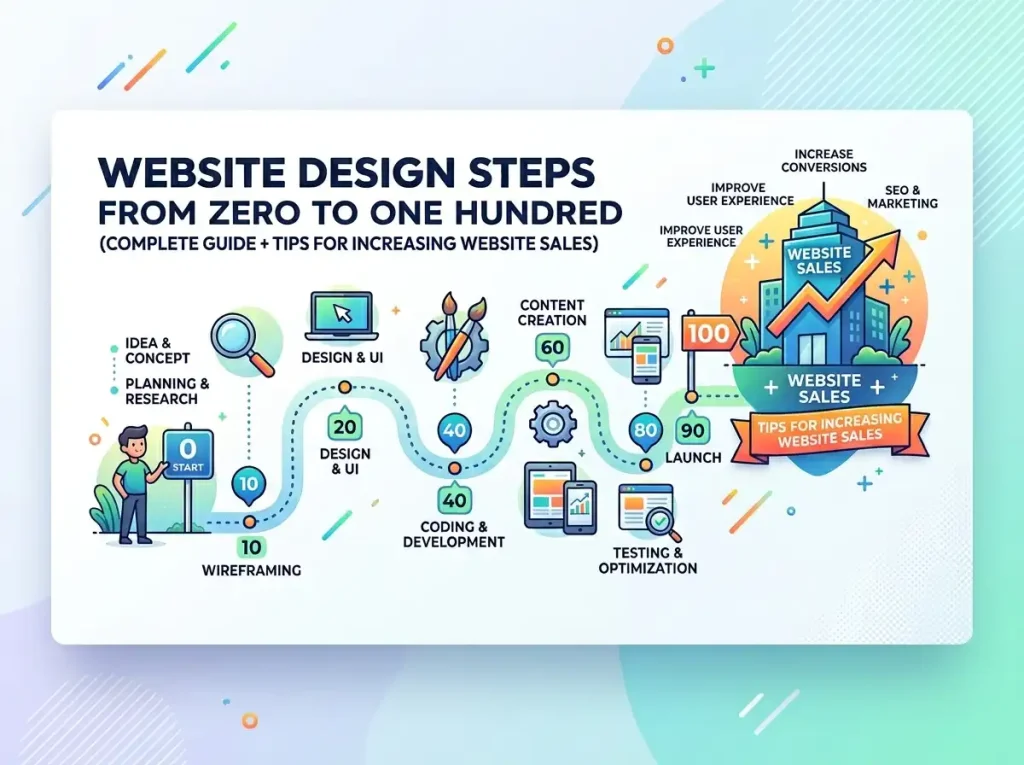
6. Website Design (UI Layer)
Now comes the visual part:
- Color psychology
- Typography
- Brand consistency
Focus on:
- Clean design
- Mobile responsiveness
- Fast loading speed
7. Content Creation & SEO Optimization
Content is the backbone of your site.
Make sure to:
- Use the website design steps keyword naturally
- Optimize meta titles and descriptions
- Structure content with headings (H1, H2, H3)
For SEO best practices, refer to Google Search Central.
8. Development & Technical Implementation
At this stage:
- Convert designs into a functional website
- Ensure clean code
- Optimize for speed (Core Web Vitals)
9. Testing & Quality Assurance
Before launching:
- Test on different devices
- Check loading speed
- Fix broken links
10. Launch & Optimization
Once live:
- Submit sitemap to Google
- Monitor analytics
- Continuously optimize
How to Increase Website Sales (Proven Tips)
Designing a website is just the beginning. To truly succeed, you must optimize for conversions.
1. Use High-Converting Landing Pages
- Clear CTA (Call-To-Action)
- Minimal distractions
- Strong value proposition
2. Leverage Paid Advertising with KayoAds
To scale your sales, paid ads are essential.
With KayoAds, you get:
- Suspension-proof accounts
- Instant balance top-ups
- 24/7 dedicated human support
- Verified accounts for higher trust
You can promote your website using:
- Google Ads (Agency Accounts)
- Meta Ads (Facebook & Instagram)
- TikTok Ads
- Agency Accounts Page
- Services (SEO, Web Design, Account Recovery)
3. Improve Website Speed
A slow website kills conversions.
- Use CDN
- Optimize images
- Minimize scripts
4. Build Trust Signals
Include:
- Testimonials
- Reviews
- SSL certificates
- Trust badges
5. Use Data & Analytics
Track:
- User behavior
- Conversion rate
- Bounce rate
Tools:
- Google Analytics
- Hotjar
Common Mistakes in Website Design Steps
Avoid these pitfalls:
- ❌ Ignoring mobile optimization
- ❌ Poor navigation structure
- ❌ Lack of SEO strategy
- ❌ No clear CTA
- ❌ Slow loading speed
Website Design Steps Checklist
Here’s a quick checklist to follow:
- Define goals
- Conduct research
- Choose platform
- Set up domain & hosting
- Create wireframe
- Design UI
- Optimize content for SEO
- Develop website
- Test everything
- Launch & optimize
Conclusion
Mastering the website design steps is crucial for building a high-performing website that not only looks great but also drives real business results.
From strategy to execution, each step plays a vital role in your success. And when combined with powerful advertising solutions like KayoAds, your website can become a consistent revenue-generating machine.
If you’re serious about scaling your online presence, start implementing these website design steps today—and don’t forget to continuously optimize for better performance and higher conversions.

Website desgin
Using our website design and development service with KayoAds

Android & IOS
Broaden your business horizons with top-notch mobile app development services

SEO Tools
At Kayoads, we specialize in delivering top-notch SEO optimize services